Widgets
Action Panel
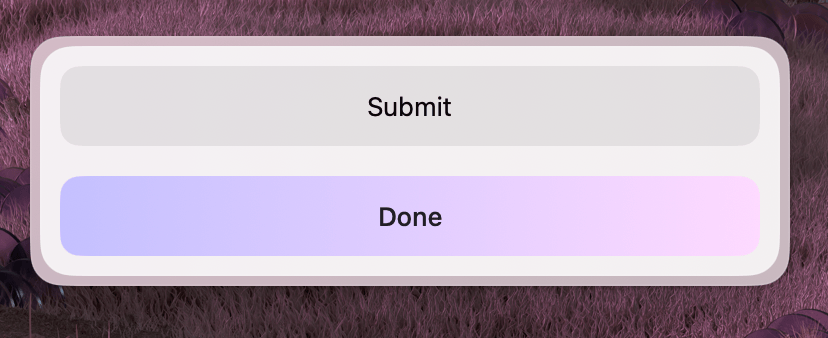
Groups a set of actions that the user can perform. Typically passed to a Form or Paper via the actions prop.
Properties
| Property | Description | Type | Default | Required |
|---|---|---|---|---|
children | Action elements | React.ReactNode | — | Yes |
layout | Layout direction | "row" | "column" | "column" | No |
Usage
To include actions, wrap your Action components inside an ActionPanel and assign it to the actions prop of your widget.
import { useState } from "react";
import { Form, Action, ActionPanel } from "@eney/api";

function MyWidget() {
  const [file, setFile] = useState("");

  function onSubmit() {
    // process the file
  }

  const actions = (
    <ActionPanel>
      <Action.SubmitForm title="Process" onSubmit={onSubmit} style="primary" />
      <Action.ShowInFinder title="Show in Finder" path={file} />
    </ActionPanel>
  );

  return (
    <Form actions={actions}>
      <Form.FilePicker
        name="file"
        label="Select file"
        value={file}
        onChange={setFile}
      />
    </Form>
  );
}
Row layout
By default, buttons are stacked vertically. To display actions side-by-side, use the layout="row" property.
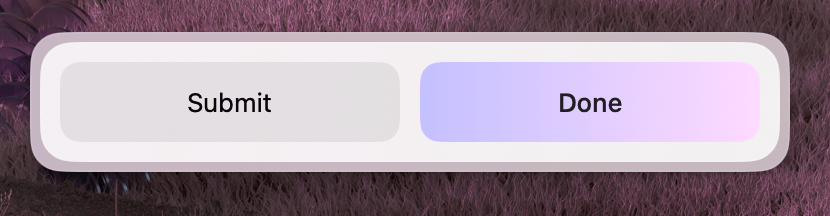
<ActionPanel layout="row">
  <Action title="Accept" onAction={onAccept} style="primary" />
  <Action title="Decline" onAction={onDecline} />
</ActionPanel>